How can stats.mydatastatssrv.com become your homepage without your operation? Annoyed by countless popups displayed by it? Follow this step-by-step removal guide to delete stats.mydatastatssrv.com without any delay.
What Is stats.mydatastatssrv.com Redirect Virus
stats.mydatastatssrv.com browser hijacker attacks worldwide users using Internet Explorer, Mozilla Firefox Google Chrome and so forth. It is distributed with the help of various online free downloads. It seizes the chance to come inside if computer users prefer Custom Installation of those desirable applications. Upon noticing the default homepage and search engine have been replaced by stats.mydatastatssrv.com, you should be aware that you are fighting against a nasty redirect virus now.
The goal of stats.mydatastatssrv.com hijacker is to advertise several commercial websites and generate traffic for them. So, when you work on a web browser, a mass of annoying ads keep blinking all the time. Although it is not as harmful as a Trojan virus, it does turn your browsing experience into chaos. To be more specific, this redirect hijacks all your site visits and reroutes them to insecure and shady web pages. Not only you are prevented from accessing the wanted websites, you may also end up with additional infections. As a result, it is categorized as a potentially unwanted program and needed to be removed ASAP.
Also, extra attention should be attached to free programs acquired from Internet. Some programs do not remind you of coming bundled software or potential changes in your system. It is recommended to check every installation step and deselect a few check boxes timely to reject unwelcome modifications.
Note: The following removal needs certain computer skills. If you want to avoid any accident caused by wrong manual operation and save your time, It’is recommended to get help from DooFix Online Experts.
Dangers of stats.mydatastatssrv.com Hijacker :
1. stats.mydatastatssrv.com gets into your system using deceptive methods;
2. stats.mydatastatssrv.com replaces your original homepage with its site and hijacks all your desired websites;
3. stats.mydatastatssrv.com may bring in other online spyware, adware and other malware;
4. stats.mydatastatssrv.com slows down the infected browser and generates tons of junk files;
5. stats.mydatastatssrv.com violates your privacy and compromises the security of your machine.
Instruction on Removing stats.mydatastatssrv.com Virus
According to our research, we found that stats.mydatastatssrv.com redirect virus often gets installed together with other programs. And stats.mydatastatssrv.com hijacker has made many changes to your computer system and web browsers. So, you should keep very patient and careful when you are following our removal steps and manually removing stats.mydatastatssrv.com virus.
1. Please close all your web browsers before deleting stats.mydatastatssrv.com malware.
2. Click Start button and then Control Panel
3. Click Add or Remove Programs
4. Locate and remove stats.mydatastatssrv.com and other unknown software
5. Run your Internet Explorer
6. Click Tools and then click Manage Add-ons option
7. Click Toolbars and Extensions to disable stats.mydatastatssrv.com or other suspicious add-ons and then click Search Providers tab to remove unwanted search engine.
After uninstalling stats.mydatastatssrv.com and reverting its changes to your browser, you need to go through the following steps if you want to completely get rid of stats.mydatastatssrv.com virus.
1. Search and delete the following registry entries of stats.mydatastatssrv.com virus
HKEY_LOCAL_MACHINE\SOFTWARE\Microsoft\Windows NT\CurrentVersion\Image File Execution Options\msmpeng.exe
HKEY_LOCAL_MACHINE\SOFTWARE\Microsoft\Windows NT\CurrentVersion\Image File Execution Options\msseces.exe
2. Search and remove the following malicious files of stats.mydatastatssrv.com malware
C:\Windows\System32\shxtea.dll
%Appdata%\Local\Temp\.exe
%User%\User Name\Roaming\.exe
You should know that manually editing registry needs some computer know-how and is rather risky for computer newbie. Another fact is that stats.mydatastatssrv.com virus is able to update its version frequently and change its file locations. So the manual removal cannot guarantee a thorough removal of stats.mydatastatssrv.com virus.
Free Download SpyHunter

Monday, March 10, 2014

Sunday, March 9, 2014
Remove qz 1 .exe - How to Fully Delete qz 1 .exe from Windows
Symptoms of Getting qz 1 .exe
1.Computer becomes choppy, sluggish and slow during operation.
2.CPU usage will not stay stable, sometimes would soar steeply even when there’s few programs running in the background.
3.Browser acts weird, such as it takes longer to load a page and gives different pages/ interface from that of former days.
4.Error messages start to come into sight when attempts to change settings and remove item are made.
5.Windows firewall as well as the one of installed anti-virus program will not stay as automatic.
6.Letters/words are turned into symbols.
The Trojan horse is pretty tiny, but it takes your computer at great risk. In detail, it slows down your system performance and disconnects your Internet frequently. If you delay to remove qz 1 .exe virus, you will get system crash and PC freezing terribly. At the same time, you might think of deleting the annoying threat via your antivirus tool. In fact, even the best antivirus software is also disabled and loses its functions to handle with the Trojan horse completely. In such cases, manual removal is highly required.
Friday, March 7, 2014
How can I remove Adware.GoonSquad!gen1 completely with virus removal guides
Adware.GoonSquad!gen1 delivers popups aggressively and you have to take lots of time to close them one by one? How could it hide itself from control panel and bypass the security tool? This post contains an effective manual Adware.GoonSquad!gen1 removal guide to help you better combat this malware.
Know More about Adware.GoonSquad!gen1 Adware
Adware.GoonSquad!gen1 is known by many computer users as a knotty adware that will make chaos to targeted computer with its ad-deliver mechanism. Once it resides in your system, it will have default DNS settings changed without notification and permission. All popular web browsers, including Internet Explorer, Mozilla Firefox, Google Chrome can be vulnerable to this malware.
Thursday, March 6, 2014
can't remove RadSteroids? How to fully delete RadSteroids virus from your pc
Want to remove RadSteroids virus?
RadSteroids is the name of an adware program that displays pop-up advertisements on Google Chrome, Mozilla Firefox, and Microsoft Internet Explorer by installing a browser helper object (BHO) onto Windows and attaching browser add-ons and extensions to affected internet browsers. Though this advertisements-serving program is often referred to as the RadSteroids virus or Rad Steroids virus, this program is not technically a computer virus, but instead is detected as potential malware or a potentially unwanted program (PUP).
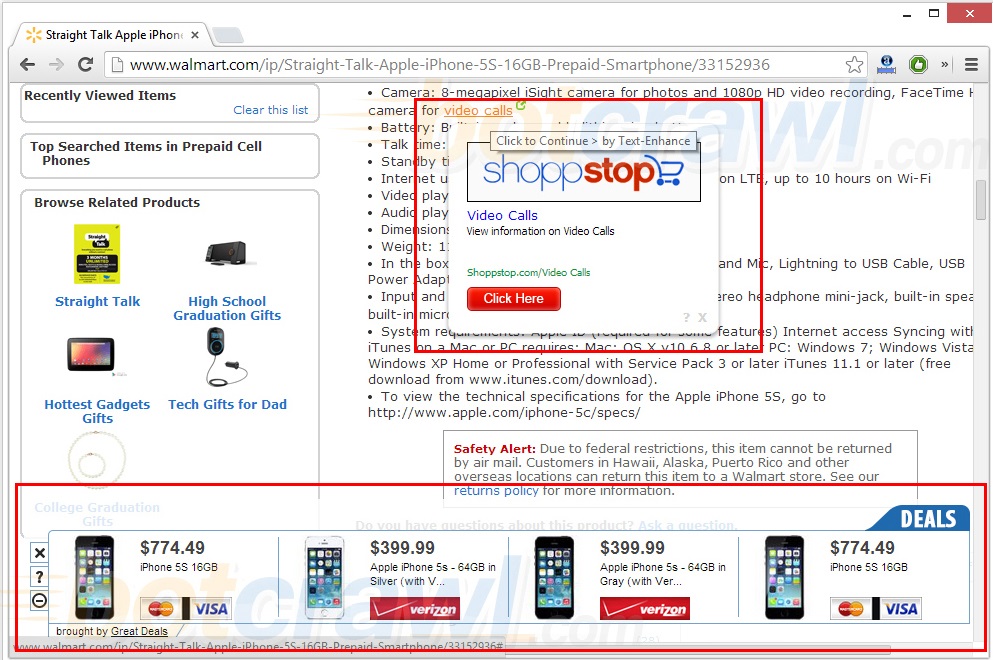
Once RadSteroids malware is installed, the adware program will being to collect user informationand in turn will use the collected data to display target advertisements, deals, and offers for searched items or currently viewed websites and products on retail websites.
Trojan horse Downloader Generic13.BVUR virus removal - How to fully delete Trojan horse in your pc
Does your PC get infected with Trojan horse Downloader Generic13.BVUR virus? It just comes back again and again to corrupt your system? Don’t worry. We offer a manual way here to help you remove this virus from your system forever.
Information about Trojan horse Downloader Generic13.BVUR
As a highly risky Trojan horse virus, Trojan horse Downloader Generic13.BVUR has the ability to destroy your entire system and bring other troubles to you. Generally, Trojan horse Downloader Generic13.BVUR is distributed in Germany and it is spread through a spam e-mail pretending to provide you with an alleged invoice.
Cdn.w55c.net virus? How to fully delete Cdn.w55c.net from Windows?
Cdn.w55c.net hijacker has taken over your IE and Chrome? How can it hide itself from control panel? Is there any fast and safe way to delete Cdn.w55c.net virus? Here is a helpful removal guide for you.
Some Information about Cdn.w55c.net Browser Hijacker
Cdn.w55c.net is a widely-spread redirect virus and has become a headache for numerous PC users. It endangers a random computer in many ways. For one thing, innocent users can be linked to shady websites and catch more threats. For another, all crucial data belonging to PC owners can be revealed to cyber criminals due to the monitor devices of Cdn.w55c.net hijacker. Therefore, it is no longer safe for users to access online bank accounts, put in password or fill in person information on the Internet.
Generally speaking, when Internet users perform some reckless actions online, they incline to get this PC threat indeliberately. Netters are not recommended to download insecure applications from hacked websites, click malware download links and open malign junk email attachments. Once executed, this computer infection begins to change default browser settings forcibly to serve its purposes, including homepage, search provider browser theme and so on. It is the reason why this infection is identified as a browser hijacker.
How to delete adsupplyads.com - Learn the adsupplyads.com virus removal guides step by step
adsupplyads.com changes your homepage? You cannot restore your browser anymore? Don’t worry. This website contains a removal guide for you to delete adsupplyads.com.
Information about Adsupplyads.com
Adsupplyads.com is not a trustworthy search engine but a dangerous browser hijacker virus. Once it gets inside your PC, it will bring lots of troubles to you. It changes the browser and DNS settings, so as to change your homepage and default search provider to http://adsupplyads.com. As a result, whenever you run the web browser, adsupplyads.com will show up automatically, and you can’t reset the former start page until you remove the virus.
When you search for information with adsupplyads.com, you will realize how useless it is. As a fake search engine, adsupplyads.com only can’t provide any correct search results for you, but also will redirect you to unwanted websites that contain many advertisements or pornographic information. Moreover, the infected machine will perform sluggishly, because adsupplyads.com installs various malware on the sly, as well as generates numerous pop-up advertisements.
What’s worse, in addition to redirection and pop-up ads, another way that adsupplyads.com uses to help hackers make money is stealing your confidential information, which may make hackers obtain your financial data and other valuable information. Therefore, hackers may steal money from your bank accounts or add extra fees to your phone accounts. In a word, to avoid so many severe consequences, once your homepage is replaced by http://adsupplyads.com, you should take action to delete the virus as quickly as possible.
Adsupplyads.com virus Screeshot:

1. Professional Removal from DooFix Online Experts (Recommended)
If you do not have enough techniques and time to get rid of this nasty virus, feel free to contact DooFix Online Experts for professional removal to save your computer and your trouble.
2. Manually Uninstall Remove Adsupplyads.com Virus
If you are familiar with various computer settings and manually editing registry, you can take the risk and try to manually remove Adsupplyads.com virus. Since there are too many steps to go through and time-consuming, please be very patient and careful when manually removing Adsupplyads.com virus.
1. Close all browsers on your machine.
2. Click Start Menu and Control Panel.

3. Click Add/ Remove Programs

4. Uninstall suspicious or unknown toolbars or software that you installed recently

1. Run Firefox
2. Click Help and then Troubleshooting Information

3. Click Reset Firefox button to reset your Firefox settings

1. Run Chrome and find Settings in Chrome
2. Then click Extensions tab and uninstall suspicious or unknown extensions

1. Run Internet Explorer and click Tools and Internet Options

2. Click Advanced tab and then click Reset button

3. Tick Delete personal settings, and then click Reset

4. Click Close after the reset.
To completely remove Adsupplyads.com virus, please:
1. Open registry editor and delete registry entries


HKEY_LOCAL_MACHINE\SOFTWARE\Microsoft\Internet Explorer\Toolbar
HKEY_LOCAL_MACHINE\SOFTWARE\Mozilla\Firefox\extensions,
2. Delete malicious files:
%AllUsersProfile%\random.exe
%AppData%\Roaming\Microsoft\Windows\Templates\random.exe
%UserProfile%\
Finally, you should reboot your PC and you will find you have already deleted adsupplyads.com from your PC.
Subscribe to:
Posts (Atom)